
See what the September 2026 app update brings for your guests: personalised recommendations, on-device AI summaries and one-tap WiFi Connect, plus a few things to set up first.
Build 2026.5.x is now live. It adds a personalisation engine, a new segmentation layer behind the scenes, some alert box and IoT improvements, richer booking cards for operators on Booking Experts and GemaPark, and compatibility with the latest phone software. On this page
Here’s what’s changed, what each part does, and why it matters.
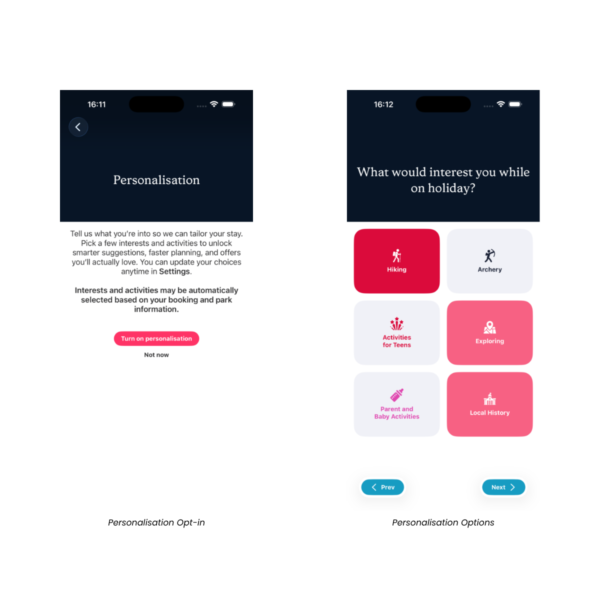
What’s new: new guests are shown a prompt asking if they’d like to personalise their experience the first time they open the app.
It’s entirely optional, they can skip it and come back later, or never use it at all. If they do set it up, they tap the interest and activity tags that apply to them from a grid set up for that site.
From there, every piece of content a guest views, likes, dislikes or favourites adjusts their interest profile, and the app starts suggesting places, routes, events, offers and home sales that actually match what they’re into. If a guest explicitly dislikes something, it won’t reappear regardless of anything else.
Why it matters: guests get shown things that actually match what they’re into, rather than scrolling past everything to find it.
For operators, the tags shown during onboarding are set up per site, so this can be tailored to reflect what’s actually on offer at your individual locations, and it all happens without anyone on site having to do anything guest by guest.
What’s new: every device is now anonymously recorded against two kinds of data:
Why it matters: this isn’t guest-facing yet, it’s the groundwork for genuinely targeted communication instead of one message going to everyone. Two releases build directly on it:
What’s new: we’ve optimised the app’s on-device AI and made it compatible with the latest rendering engine changes. Why it matters: the app keeps running properly on the newest phones and tablets from day one of the the latest phone software rollout. Coming later (not this release): the app is also set to use on-device AI for content summaries, recommendation reasoning, and AI-generated Siri responses, all processed privately on the guest’s device with nothing sent to a server.

What’s new: MetPow scan support and WiFi Connect support have both been added to alert boxes.
A MetPow alert now opens a QR scanner directly inside the app. Guests scan their MetPow QR code without leaving the app or switching to a separate scanning tool, and it takes them straight to the same screen they’d get scanning it any other way, just built into the experience rather than sitting outside it.
WiFi Connect, one tap or a QR code to join the site’s network, is included here too. It’s had a number of fixes and improvements since it first appeared, and for most of the client base this is effectively their first time seeing it live.
Why it matters: guests can sort a quick, practical task, checking their energy usage or getting connected to the site’s WiFi, straight from the alert itself, without hunting through the app or switching to another app entirely.
What’s new: live IoT data now renders on Places, Welcome Packs and the home screen.
This isn’t tied to any one data type or provider. Any data source an operator wants to connect can be set up to render here, along with whatever text and imagery the operator chooses alongside it. One site might show surf conditions, another might show windspeed on a specific field, it’s entirely down to what the operator sets up.
Why it matters: guests get real, live information about the venue right where they’re already looking, whatever the operator has chosen to show, without needing to find a separate screen for it.
What’s new: booking cards have been reshuffled to carry richer detail. Availability depends on your PMS:
| Feature | Availability |
| Specific unit/pitch name | Booking Experts, GemaPark (RMS coming soon) |
| Unit/pitch imagery | Booking Experts, GemaPark (RMS coming soon) |
| Unit/pitch location | Booking Experts (RMS coming soon) |
| Key code support | Booking Experts |
| Secure one-click login | GemaPark (Booking Experts guest portal coming soon) |
| Check-in/out times | Booking Experts |
| Payment schedules | Booking Experts |
Coming soon to RMS Cloud operators.
Unit/pitch location is shown as coordinates and a what3words reference, so guests can open it directly in their preferred map app, and it also shows on the in-site map within the app itself.
Key code support shows whatever code an operator has set for that unit, a lock-box combination, a keypad code, a padlock combination, that sort of thing. It’s a straightforward piece of information, not a digital unlocking system of any kind. On Booking Experts, it can also be restricted to only appear to a guest between their check-in and check-out times.
Why it matters: guests know which specific unit is theirs, exactly where it is and how to get in, without waiting at reception to find out. That’s fewer “where do I go” questions on arrival day for on-site teams.
Bug fixes throughout the app, on top of everything above.

Keep an eye out for the November segment-notification release and the January rule-based sends, both build directly on the personalisation and segmentation work above.
If you’d like to see how any of this looks for your business, get in touch with your Holidaymaker account team, or browse the full knowledge base for the technical detail behind any of the above.
Related reading: the Autumn 2025 release overview, in-app direct bookings with Booking Experts and our integrations page. For setup guidance, visit the Help Centre.

Send us a question about the September release and we will get back to you.
Ask us a question
A recap of the Autumn 2025 release: support for the latest phone software, IoT data feeds, the new record health check and what arrived in HM Core 2025.12.1, plus three CMS tidy-up jobs.
Read more

See how Holidaymaker and Booking Experts let guests book without leaving your branded park app, so you keep the booking and the guest data.
Read more

A pre-season check for your app, Seeview screens, kiosks and TV apps, with a twelve-point checklist and three quick actions for opening day.
Read more